DreamForgeXDreamForgeX
AI ToolsGalleryMarketplacePricing

Background Editor

5 credits

Remove or replace backgrounds with AI

Sign in free to use this tool

50 credits / day on the free plan — no credit card required. You'll need an account before the Generate button below will work.

See pricing
Preview mode — sign in to generate

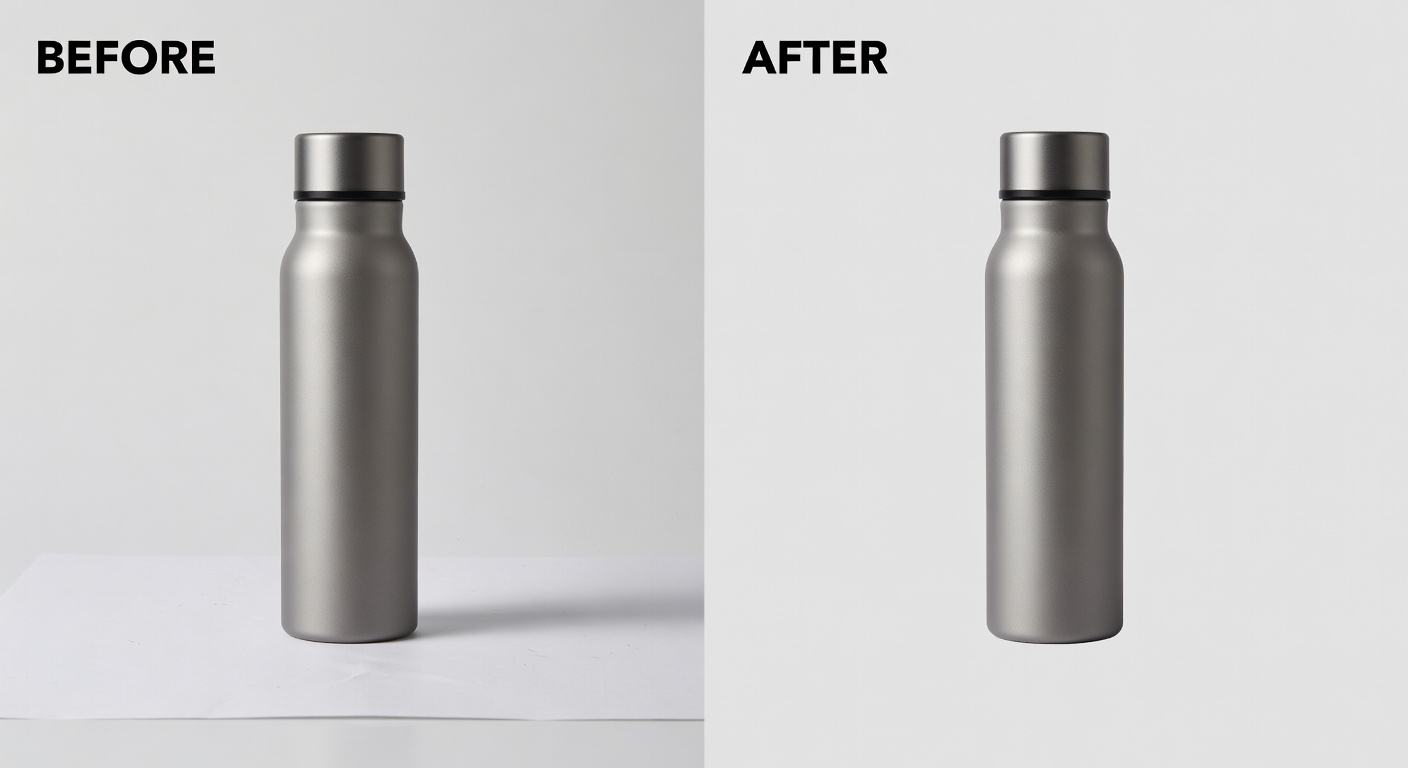
Example output:

Background removal example

AI will detect the main subject and remove the background, leaving a clean white/transparent result.

No Image Selected

Upload an image to remove or replace its background with AI.

What is Background?

The Background tool helps creators and freelancers remove or replace image backgrounds using AI, making it easier to edit photos for marketing materials or product shots. Ideal for small-business owners needing quick visual tweaks without advanced software, it streamlines workflows by delivering clean, transparent PNG files in seconds. This saves time on manual editing, allowing focus on creative projects while ensuring professional results for online listings or social media.

How it works

  1. 1

    Upload your image to the tool.

  2. 2

    Select to remove the existing background or choose a new one from options.

  3. 3

    AI processes the image and generates a preview.

  4. 4

    Download the edited file as a PNG with transparent background, typically under 5MB.

Popular use cases

  • Prepare product images for Etsy listings by isolating items on white backgrounds.
  • Create custom thumbnails for YouTube videos with swapped scenic backdrops.
  • Edit headshots for LinkedIn profiles to fit professional themes.
  • Design social media graphics for Instagram by removing cluttered environments.
  • Enhance real estate photos by changing indoor backgrounds to neutral tones.
  • Build mockups for freelance client presentations with brand-aligned settings.

Frequently asked questions

What file formats does the tool support?+
It accepts common formats like JPG, PNG, and WebP up to 10MB in size. Outputs are always in PNG for transparency support. Processing takes about 10-30 seconds depending on image complexity.
Are there usage rights for generated images?+
You own the rights to edited images for personal and commercial use. Avoid uploading copyrighted material without permission. No attribution to the tool is required.
Is there a limit on daily uses?+
Free tier allows 5 edits per day; premium unlocks unlimited with faster speeds. Quality remains consistent across plans, focusing on accurate edge detection.
AI generated showcase
DreamForgeXDreamForgeX

The all-in-one AI creative studio. 100+ tools for images, video, audio, and design — powered by the world's best AI models.

Powered by

Grok (xAI)OpenAIGeminiClaudeStability AIReplicatefal.aiTogether AICloudflare AIGroqRunwayKlingSync Labs

Self-hosted on DreamForge GPUs

Flux Pro/Dev/SchnellCogVideoX-5BMusicGenAudioGenCatVTONBark TTSReal-ESRGANRMBG-2.0Exclusive LoRAs

Stay Updated

Create

  • Studio
  • AI Canvas
  • Video Studio
  • Gallery
  • Marketplace
  • Batch Generator

Tools

  • Text-to-Image
  • AI Song Creator
  • Music Video Studio
  • Text-to-Video
  • AI Headshots
  • Logo Maker
  • All 100+ Tools

Resources

  • Pricing
  • API Documentation
  • Prompt Guide
  • Community Gallery
  • Character Studio

Company

  • About
  • What's new
  • Terms of Service
  • Privacy Policy
  • Contact
DreamForgeX on Product Hunt

© 2026 DreamForgeX AI. All rights reserved.

TermsPrivacy

Made with for creators